
Articles
How We Built Four AI Agents to Convert Legacy HTML Into a Strapi CMS

By Claus Villumsen
01 May, 2025
Share this article
We had a mountain of legacy HTML that needed to become structured Strapi CMS content. Manual conversion would have taken months. We built four AI agents to do it instead. Here is how they work.
Every legacy modernization project eventually hits the same wall. The code is being replaced. The architecture is improving. And then someone points at the content and asks what happens to all of that.
In our case, the answer was a mountain of legacy HTML. Thousands of pages, inconsistently structured, carrying years of accumulated content in a format that no modern CMS wanted to ingest directly. Manual conversion was not realistic. It would have taken a team of developers months, introduced thousands of errors, and cost more than the rest of the project combined.
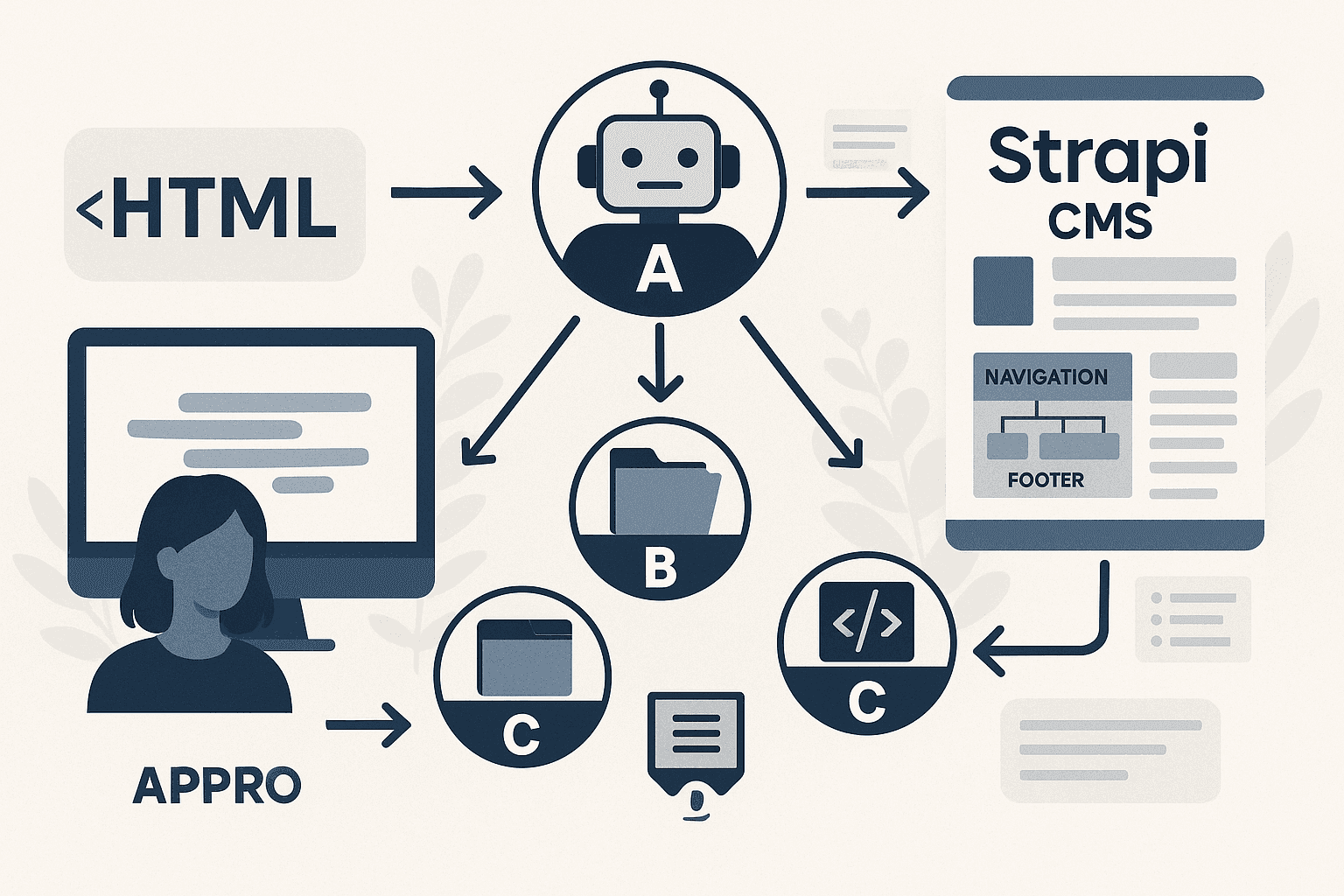
So we built something different. A crew of four specialized AI agents, each with a single job, working together to take raw HTML and produce fully structured Strapi CMS content. Here is how each one works and why the architecture is the way it is.
Why use multiple AI agents instead of one for CMS migration?
Multiple AI agents prevent task overload and improve accuracy. A single agent handling all conversion tasks becomes inefficient and error-prone. Specialized agents divide responsibilities for orchestration, data collection, page building, and navigation, enabling parallel processing and producing more reliable results when converting complex legacy HTML to structured Strapi CMS content.
The first instinct is to build one agent and ask it to do everything. Understand the HTML, extract the content, map it to the CMS schema, handle navigation, manage the process. One prompt, one model, one output.
This approach fails on large volumes for the same reason that asking a single person to do every job in a project fails. The cognitive load becomes too high. The context window fills up with irrelevant information. The output quality drops as the task complexity increases.
The better approach is specialization. Give each agent one job, constrained inputs, and a well-defined output format. Build an orchestrator to manage the flow. The system becomes more reliable, easier to debug, and easier to improve incrementally.
What does the Orchestrator agent do in the conversion system?
The Orchestrator agent manages the entire conversion workflow by coordinating all other agents. It analyzes legacy HTML structure, determines conversion sequence, delegates tasks to specialized agents, monitors progress, handles errors, and ensures synchronized operation. This central coordination ensures all components work together to produce complete, accurate Strapi CMS content from legacy HTML sources.
Agent A runs the process. It maintains a reusable URL registry that tracks which pages have been processed, which are in progress, and which have failed. It dishes out work to the other agents, monitors their outputs, and handles retries when something goes wrong.
Without Agent A, the rest of the system would have no coherence. Pages would be processed in arbitrary order. Failures would be lost. The same URL might be processed multiple times. The Orchestrator is the reason the system can run reliably at scale.
How does the Collector agent extract content from HTML?
The Collector agent scans legacy HTML files to identify and extract all content elements including text, images, links, metadata, and structural patterns. It normalizes inconsistent markup, categorizes content types, preserves semantic relationships, and prepares clean data packages. These organized packages enable the Page Builder agent to efficiently transform raw HTML into Strapi-compatible structures.
Agent B finds pages. It is the scout, the crawler, the one responsible for discovering everything that needs to be processed and feeding it upstream to Agent A.
Its job sounds simple. In practice it is not. Legacy HTML sites are rarely consistent. Navigation structures vary. Some pages are linked from menus. Others exist only in sitemaps. Some are orphaned entirely. Agent B handles all of this, building a complete inventory before any transformation begins.
What does the Page Builder agent create in Strapi?
The Page Builder agent transforms extracted HTML content into structured Strapi CMS pages. It maps legacy content to appropriate Strapi content types, creates dynamic zones and reusable components, applies formatting rules, handles media assets, validates data integrity, and generates final page structures. This ensures content populates the new CMS correctly and maintains quality.
Agent C does the heaviest work. It takes raw HTML from a single page and reshapes it into Strapi-friendly JSON. Pages, SEO data, components, APIs, the whole structure. It turns a mess of legacy markup into something clean, normalized, and ready to drop into a CMS.
The quality of Agent C's output determines the quality of everything downstream. We spent most of our engineering time here, training the agent on edge cases, handling inconsistent HTML structures, and building validation into the output format so that errors surface early rather than at import time.
How does the Navigation Architect agent rebuild site structure?
The Navigation Architect agent reconstructs complete site hierarchy by analyzing page relationships, URL structures, and internal links from legacy HTML. It creates navigation menus, establishes parent-child page relationships, builds breadcrumb paths, maps URL redirects, and ensures the new Strapi site maintains logical navigation flow that matches or improves the original structure.
Agent D handles the structural connective tissue that makes a website function. Navigation menus, footer structures, internal linking patterns. It builds the scaffolding that ties pages together into a coherent experience rather than an unconnected pile of content.
This is the piece most people forget when they think about content migration. Getting the pages right is necessary but not sufficient. A site where no page knows how to reach any other page is not a functioning website. Agent D is the reason the output is a site, not just a collection of documents.
What does the four-agent system output after conversion?
The system produces structured Strapi content types, fully populated pages with formatted content, complete navigation hierarchies, organized media asset libraries, URL mappings, preserved metadata, and content relationships. It generates import-ready JSON files, detailed migration reports, error logs, and validation summaries that enable immediate deployment of converted content into the production Strapi environment.
The four agents together take a legacy HTML site and produce a fully structured Strapi CMS import, ready for a developer to run. The output is consistent, validated, and documented. The pages are structured. The navigation is intact. The SEO data is preserved. The content is normalized.
What would have taken months of manual work happens in hours. Not because AI is magic. Because the problem was broken down into four well-defined jobs, each assigned to an agent with the right context and the right constraints to do that job reliably.
That is the principle behind everything we build at Kodebaze. Not one model trying to do everything. Many constrained agents, each doing one thing well, coordinated by a system that keeps the whole process moving forward.
Frequently Asked Questions
What is a multi-agent AI system for CMS migration?
A multi-agent AI system for CMS migration uses multiple specialized AI agents that work together to automate content conversion. Each agent handles a specific task like orchestration, data collection, page building, or navigation structure, creating a division of labor that ensures accurate transformation of legacy HTML into structured CMS content without manual intervention.
Why use four AI agents instead of one for HTML to Strapi conversion?
Using four specialized AI agents instead of one prevents task overload and improves accuracy. A single agent handling orchestration, data collection, page building, and navigation simultaneously becomes inefficient and error-prone. Dividing responsibilities among multiple agents creates clear accountability, enables parallel processing, and produces more reliable conversion results for complex legacy HTML structures.
What does the Orchestrator agent do in AI-powered CMS migration?
The Orchestrator agent manages the entire conversion workflow by coordinating the other three agents. It analyzes the legacy HTML structure, determines the conversion sequence, delegates tasks to the Collector, Page Builder, and Navigation Architect agents, monitors progress, handles errors, and ensures all components work together to produce complete Strapi CMS content.
How does the Collector agent extract data from legacy HTML?
The Collector agent scans legacy HTML files to identify and extract content elements including text, images, links, metadata, and structural patterns. It normalizes inconsistent markup, categorizes content types, preserves semantic relationships, and prepares clean data packages that the Page Builder agent can transform into Strapi-compatible content structures.
What role does the Page Builder agent play in Strapi conversion?
The Page Builder agent transforms extracted HTML content into structured Strapi CMS pages. It maps legacy content to Strapi content types, creates dynamic zones and components, applies formatting rules, handles media assets, validates data integrity, and generates the final page structures that populate the new CMS environment.
How does the Navigation Architect agent rebuild site structure?
The Navigation Architect agent reconstructs the site hierarchy by analyzing page relationships, URL structures, and internal links from the legacy HTML. It creates navigation menus, establishes parent-child page relationships, builds breadcrumb paths, maps redirects, and ensures the new Strapi site maintains logical navigation flow that matches or improves the original structure.
How long does AI-powered HTML to Strapi migration take?
AI-powered HTML to Strapi migration using a four-agent system reduces conversion time from months to days or weeks. The exact timeline depends on content volume, HTML complexity, and customization requirements. Automated processing handles thousands of pages in hours, while setup, testing, and refinement typically require one to three weeks of development work.
What outputs does a multi-agent CMS conversion system produce?
A multi-agent CMS conversion system produces structured Strapi content types, populated pages with formatted content, navigation hierarchies, media asset libraries, URL mappings, metadata, and content relationships. The system generates import-ready JSON files, migration reports, error logs, and validation summaries that enable seamless deployment of the converted content into production.
The same multi-agent approach powers how Kodebaze analyzes and modernizes legacy codebases. One agent per job. One constraint per agent.
See how the AI modernization factory works →Related articles

Work
Productivity
Legacy modernization requires different instincts than greenfield development. These are the eleven habits that separate engineers who succeed at it from those who struggle.


AI

Legacy Modernization
AI
AI + Human
AI + Human software Solution
© 2026 Kodebaze. All Rights Reserved.